
ReelJoy
ABACUS GLOBALEntertainment
4.717.00 Reviews
- Version
- 1.3.0
- Installs
- 10.00K
- Age Rating
- Teen
Screenshots


Our Review of ReelJoy
 Analysis by Appyee
I tried ReelJoy with one question in mind: does it work as an easy entertainment app when more than one person in a household wants to use the same phone or tablet? Its short store message, “ReelJoy,” gives almost no sense of the experience, while the fuller summary invites you to open the app and see what comes next. That makes the first few minutes especially important. In my experience, this is an app best approached as a quick discovery tool rather than as a complete replacement for every streaming or video service.
ReelJoy is a free entertainment app from ABACUS GLOBAL, aimed at Teen users and available on Android devices running version 7.0 or later. The current release is 1.3.0. It has reached over ten thousand installs and holds a 4.7 average from more than four hundred ratings, which suggests that the basic idea has connected with the people who have tried it. I would still treat those figures as a starting point, not a guarantee that it will match every household’s viewing habits.
How ReelJoy fits into a shared household
When I think about ReelJoy on a shared household device, I see the biggest opportunity in making the handoff between users feel intentional rather than letting one person’s browsing set the tone for everyone. I’d agree on who is choosing and whether the session is for the whole room before opening it; that small routine can make casual discovery feel fairer.
A useful choice for short, unplanned viewing
The most natural situation for ReelJoy is a shared device sitting on a kitchen counter, coffee table, or bedside stand. One person has a few spare minutes, another person is nearby, and nobody wants to spend a long time deciding what to watch. In that setting, the app’s “what happens next” idea is appealing because it encourages discovery instead of demanding that you arrive with a specific title in mind.
I can imagine using it after dinner when one family member has finished a longer show and another wants something different. Rather than handing over a full streaming account or searching through several familiar services, the person holding the device can open ReelJoy and browse together with everyone else. That shared decision is one of its more interesting strengths: the app can become a small group activity instead of a private queue controlled by one person.
That does not mean it is ideal for every viewing session. If I already know the exact film, series, or channel I want, a conventional streaming service with a large, searchable library is usually more efficient. ReelJoy makes more sense when the goal is to stumble across something entertaining, especially when the group is undecided.
Why the shared-device angle matters
On a personal phone, entertainment recommendations can be very individual. On a household tablet, they quickly become a negotiation. One person may want something light, another may prefer suspense, and a teenager may not want to watch the same material as a younger child. ReelJoy is easier to handle when everyone agrees that the session is casual and exploratory.
My practical advice is to decide who is using the app before opening it. If the device is passed around freely, the next person may continue from whatever the previous person was exploring. That is not necessarily a problem, but it can make the experience feel less personal. A shared device works best when users treat each session as a fresh browsing moment rather than assuming that the app will represent each person’s separate taste.
This is also where the Teen content rating should shape expectations. I would not hand the device to a young child and assume that every recommendation will suit them. For a mixed-age household, an adult should be present during discovery, particularly when the app is being used by someone younger than the rating suggests.
Starting without turning setup into a project
The appeal of a free entertainment app is reduced if getting started becomes complicated. ReelJoy is most attractive when I can open it and begin exploring without preparing a household media system around it. That makes it suitable for a spare device, a quick visit from friends, or an evening when nobody wants to manage another elaborate subscription environment.
Even so, I would take a moment to establish simple boundaries before sharing the device. Decide whether the app is for everyone in the room, whether a teenager can use it independently, and whether the device owner wants other people browsing on their behalf. These are not technical controls; they are household rules. They matter because a shared entertainment app can blur the line between one person’s casual discovery and another person’s private preferences.
For a personal device, I would keep the use case narrower. Open it when I want discovery, then return to my usual service when I need a dependable library or a familiar watchlist. That division prevents ReelJoy from being judged unfairly for something it is not trying to replace.
Managing boundaries around purchases
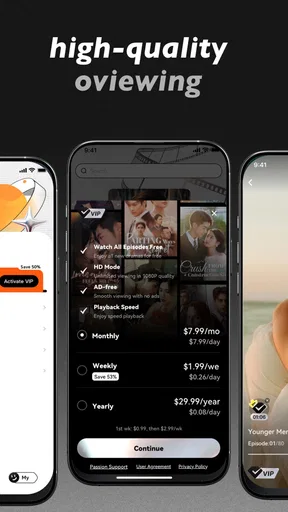
ReelJoy is free to download, but it includes optional in-app purchases priced from $7.99 to $29.99 per item. That makes purchase awareness important on a shared phone or tablet. Before allowing someone else to browse, I would make sure the device owner knows that paid items may appear and that the person using the app understands not to confirm a purchase without permission.
This is one of the clearest trade-offs for families. A free starting point is convenient, but “free” does not mean every part of the experience is cost-free. I would be especially careful with a device that has a payment method already attached to the relevant store account. The safest routine is simple: one adult handles any purchase decision, while everyone else can still participate in choosing what to explore.
The purchase range also affects how I judge value. If I only want occasional entertainment discovery, I would stay within the free starting experience and see whether it earns a regular place in my routine. If the app repeatedly pushes me toward paid items before I find useful content, I would prefer a service with a clearer all-in-one subscription or an entirely free alternative supported by advertising.
Coordinating what to watch next
ReelJoy’s strongest household role is not replacing a family library; it is helping people coordinate. When a group cannot agree on a specific title, opening the app gives the conversation a shared focus. Instead of one person scrolling privately and announcing a choice, everyone can react to the possibilities as they appear.
I find that approach useful for short sessions. A parent and teenager can take turns suggesting whether the current option feels suitable. Roommates can use the app when they want background entertainment but do not want to commit to a long series. Friends sharing a tablet can treat the discovery process itself as part of the evening.
There is a small but important discipline here: do not assume that the last person’s choice should control the next session. On a shared device, it helps to say out loud whether you are continuing an earlier exploration or starting again for the current group. That avoids the common household problem where one person opens an app and immediately finds recommendations shaped by someone else’s brief visit.
I would also avoid presenting ReelJoy as a universal compromise. Coordination works only when the group accepts that discovery may produce an imperfect match. If one viewer needs precise genre filters, accessibility preferences, language choices, or a carefully managed queue, a more established platform may be the better tool. ReelJoy is more comfortable when the group can tolerate a little uncertainty.
Teen use, trust, and adult involvement
The Teen rating is a useful signal for how I would position the app in a home. It is not a reason to reject ReelJoy, but it is a reason to avoid treating it as automatically suitable for every age. An older teenager may be able to explore independently, while a younger child may need an adult to make the final decision about what is viewed.
Because I would not invent family controls that are not part of the confirmed product details, I would rely on supervision and clear device rules. An adult can preview what is being considered, keep the app on a shared screen rather than a private child’s device, and decide whether paid content is allowed. Those habits are more dependable than assuming an entertainment app will understand the difference between every member of a household.
Trust also works in the other direction. Teenagers may not want their browsing choices treated as a family playlist, while parents may not want their own recommendations mixed into a child’s viewing session. If the app is used on one device, I would agree on when browsing is communal and when the owner gets private use. That small conversation can prevent more friction than any amount of scrolling.
For grandparents or less confident users, the app may be appealing if the discovery concept feels easier than managing several services. I would sit with them during the first session, explain the difference between exploring and buying, and make sure they know how to stop when something does not look appropriate. The goal is not to make the experience complicated; it is to make the boundaries visible.
What I would compare before choosing it
Compared with a traditional streaming app, ReelJoy appears better suited to spontaneous discovery than to ownership of a carefully organized catalog. A familiar streaming service usually wins when I want a known title, a continuing series, or a predictable profile for each household member. ReelJoy is more interesting when I want the app to help start the conversation.
Compared with short-video platforms, it offers a different kind of promise. Short-video feeds are often built around rapid, highly personal scrolling, while ReelJoy’s identity is tied more closely to finding out what comes next. I would choose the short-video alternative when I want endless individual browsing; I would choose ReelJoy when a group wants to explore together without one person disappearing into a private feed.
Compared with free video platforms, the decision comes down to tolerance for uncertainty and paid options. A free platform with a large public catalog may provide more obvious control over search, while ReelJoy may feel more playful for people who do not know what they want. The optional purchases mean I would examine the actual flow carefully before making it the default app on a family device.
Small habits that improve the experience
My first tip is to use ReelJoy at the beginning of a viewing session, not after spending twenty minutes on another service. Its discovery role is most valuable when the group is still deciding. Once everyone has agreed on a specific title, switching to the service that reliably provides that title is usually faster.
My second tip is to keep a shared device neutral. If one person browses for a long time, the next user may inherit a context that does not fit them. I would close the app after a session and tell the next user whether the previous browsing was personal or communal. That simple handoff makes the app feel less confusing.
My third tip is to separate discovery from payment. Let everyone suggest and react, but keep purchase approval with the device owner. This preserves the social part of ReelJoy while reducing the chance that a casual tap becomes an unwanted charge.
My fourth tip is to treat the Teen rating as part of the setup conversation. If children of different ages share the device, decide in advance who can browse alone and who needs an adult nearby. That is particularly useful when the app is opened spontaneously, because spontaneous use is exactly when household rules are easiest to forget.
Performance expectations and everyday friction
The app’s current version is 1.3.0, and its user response is encouraging, but I would not confuse a strong average rating with a perfect fit for every device or routine. Entertainment apps are judged heavily by how quickly they help people reach something worth watching. Any moment spent searching, deciding, or sorting out account boundaries feels more noticeable when the whole household is waiting.
That is why I prefer a short trial in a real situation rather than deciding from the store page. Use it on the device that will actually be shared, with the people who will actually watch, and see whether the discovery process helps or slows the group down. A solo test may feel smooth while a family session exposes disagreements about age, privacy, or purchases.
I also would not install ReelJoy simply because it is free. Free installation lowers the barrier to testing, but the app still needs to earn storage space and attention. If my household already has a dependable service for spontaneous viewing and nobody enjoys recommendation-based browsing, ReelJoy may add another icon without solving a real problem.
Who should try it and who should skip it
I would recommend trying ReelJoy to people who enjoy being surprised by their entertainment choices, households that often struggle to decide what to watch, and friends who want a shared browsing activity on a common device. It is also a reasonable option for someone who wants to test a free entertainment app before deciding whether optional purchases have any value for them.
I would be more cautious if the main user is a young child, if several people need completely separate viewing identities, or if the household wants strict control over every recommendation and transaction. In those cases, a service designed around profiles, parental management, or a known catalog may be a better match. I would also skip it if I need one specific film or show immediately.
The developer, ABACUS GLOBAL, has positioned the app around a simple discovery message, and that simplicity is both its attraction and its limitation. ReelJoy does not need to become the center of a household’s entertainment setup to be useful. It only needs to make the awkward “what should we watch?” moment easier.
My household verdict
After looking at ReelJoy through the lens of shared use, I see it as a lightweight entertainment companion rather than a complete family media hub. Its free entry point, Teen rating, and discovery-first identity make it easy to test, while the optional purchases and lack of a clearly separate household workflow mean that adults should establish boundaries before passing the device around.
The app is at its best when the group wants to explore together and accepts that the result may be unexpected. It is less convincing when every viewer needs a private profile, a precise catalog, or a guaranteed answer. I would keep it available on a shared tablet for casual evenings, but I would not remove the household’s established streaming options just to make room for it.
My honest recommendation is to try ReelJoy with one realistic session: invite the people who normally share the device, agree on the age and purchase rules, and see whether the app helps you reach a decision without creating a new argument. If it turns indecision into a pleasant few minutes of discovery, it has found its purpose. For shared, low-pressure entertainment, that is a worthwhile role; for tightly managed viewing, another category of app will serve you better.
Verdict
Strengths of ReelJoy
- Quick access to short-form videos in a simple, easy-to-use interface.
- Personalized recommendations help surface content matching your interests.
- Smooth scrolling experience with fast loading on most modern devices.
- Useful sharing options make sending entertaining clips to friends convenient.
- Regular content updates provide new videos to discover frequently.
Limitations of ReelJoy
- The feed may become repetitive if you interact with only a narrow range of content.
- Video playback can consume significant mobile data without Wi-Fi.
- Some content may include ads or promotional material between videos.
- Recommendation quality may vary until the app learns your viewing preferences.
- Privacy-conscious users may dislike the data required for personalized content.
Similar Picks in This Category
View All
Google Play Games
Google LLC3.9

Netflix
Netflix, Inc.4.8

YouTube Kids
Google LLC4.2

Disney+
Disney4.4

Prime Video
Amazon Mobile LLC4.7

Steam
Valve Corporation3.2
Frequently Asked Questions
What is ReelJoy, and what can I use it for?
ReelJoy is an entertainment-focused app designed for discovering and watching short-form video content. Its feed generally helps users browse clips by scrolling, while recommendations may adapt to viewing activity and stated interests. Before downloading, check the current store listing to confirm whether ReelJoy focuses on movies, short videos, social content, or another format, since available features and supported regions can change over time.
Is ReelJoy free to download and use?
ReelJoy may be available as a free download, but users should review the app’s pricing details before creating an account or starting playback. Some content or functions can require subscriptions, in-app purchases, advertising support, or premium access. On Android and iOS, the final price, renewal terms, trial conditions, and cancellation process are shown through the relevant app store.
Does ReelJoy require an account or personal information?
Depending on the version and region, ReelJoy may allow limited browsing without registration but could require an account for personalized recommendations, saving favorites, synchronizing activity, or accessing restricted content. During setup, review the permissions and privacy policy carefully. Avoid providing unnecessary information, and use a strong, unique password if the app supports account creation.
Can I watch ReelJoy content offline or without an internet connection?
Offline viewing is not guaranteed and depends on the app’s current features, licensing arrangements, and subscription level. If ReelJoy provides downloads, look for an official download button inside the app rather than relying on third-party tools. Downloaded content may expire, require periodic online verification, use significant storage, and remain available only while your account or subscription is active.
Is ReelJoy safe for children and suitable for all users?
ReelJoy’s suitability depends on the content shown, advertising, social features, and the age rating listed in the Google Play Store or Apple App Store. Parents should check available controls, review privacy settings, and supervise younger users, especially if the app includes comments, messaging, or user-generated videos. Also verify permissions and report inappropriate content through official channels.
